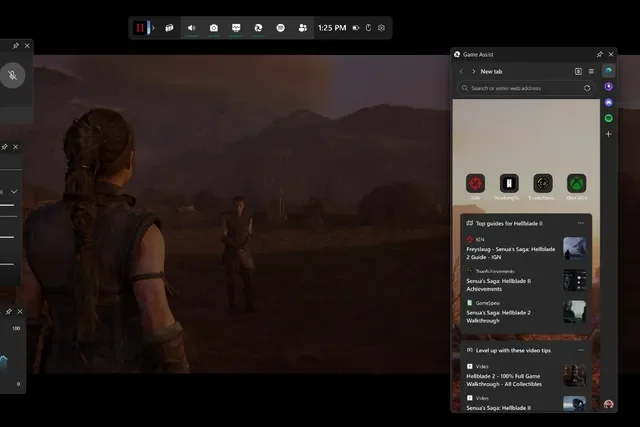

Microsoft has officially launched Game Assist, a Steam-like in-game browser overlay for Windows 11, making it easier for gamers to access tips, guides, and walkthroughs without ever leaving their game. After months of beta testing, the Microsoft Edge Game Assist feature is now available in the stable version of the browser, bringing game-aware functionality to the Windows Game Bar. Once activated, the feature is accessible through the Windows Game Bar (Windows key + G). Whether you're tackling a tricky boss fight or looking up crafting recipes, this built-in overlay is a game-changer for Windows 11 users. For blind and low-vision players, it could mean a much wider range of games becoming playable without barriers. The idea behind the new feature is to reduce the need for gamers to interact with the traditional Windows desktop interface, which can be clunky on handheld PCs. Read more in our articles including "Microsoft Rolls Out Steam-Style Game Assist Overlay for Windows 11 Gamers" and "Unity adds native screen reader support on macOS and Windows for better game accessibility".
Microsoft has officially launched Game Assist, a Steam-like in-game browser overlay for Windows 11, making…
Jan 22, 2025
Unity has introduced a major accessibility feature to its engine, adding native support for system…
Sep 6, 2025
Microsoft is testing a new feature in its Xbox app for Windows 11 that could…
Aug 22, 2025These past months have been a big blast for the gaming community with the launch…
Feb 19, 2017There are tons of games that you can play on iOS and Android, but what…
Jul 31, 2017The Steam Summer Sale kicked off last June 23, and some of the deals on…
Jun 27, 2017Microsoft has officially launched Game Assist, a Steam-like in-game browser overlay for Windows 11, making it easier for gamers to access tips, guides, and walkthroughs without ever leaving their game. After months of beta testing, the Microsoft Edge Game Assist feature is now available in the stable version of the browser, bringing game-aware functionality to the Windows Game Bar.
Once activated, the feature is accessible through the Windows Game Bar (Windows key + G). Whether you're tackling a tricky boss fight or looking up crafting recipes, this built-in overlay is a game-changer for Windows 11 users. For blind and low-vision players, it could mean a much wider range of games becoming playable without barriers.
Our coverage of Windows Game Bar includes: "Microsoft Rolls Out Steam-Style Game Assist Overlay for Windows 11 Gamers"; "Unity adds native screen reader support on macOS and Windows for better game accessibility"; "Microsoft Adds PC Game Launchers and Apps to Xbox App on Windows". Each article provides unique insights and information.