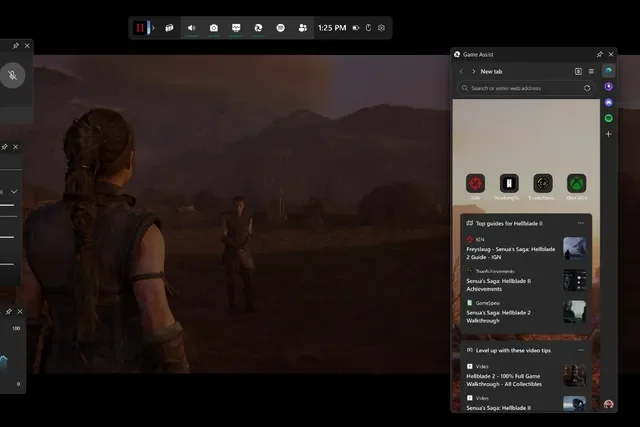

Microsoft has officially launched Game Assist, a Steam-like in-game browser overlay for Windows 11, making it easier for gamers to access tips, guides, and walkthroughs without ever leaving their game. After months of beta testing, the Microsoft Edge Game Assist feature is now available in the stable version of the browser, bringing game-aware functionality to the Windows Game Bar. Much like Valve’s Steam overlay browser, Game Assist detects the game you’re playing and automatically suggests relevant tips and guides in a side panel. https://youtu.be/NZadyqM7Gxs To enable Game Assist, users can navigate to Microsoft Edge > Settings > Search for "Game Assist" and install the widget. Even if a game isn’t officially supported, players can still use Game Assist to browse guides, forums, or any other websites while playing. Game Assist leverages cookies, autofill, and favorites from the standard Microsoft Edge browser, meaning your saved bookmarks and preferences carry over seamlessly. With Game Assist, Microsoft is further integrating Edge into the gaming experience, offering PC gamers a more seamless way to access information without interrupting gameplay. Gamescom 2026 has officially wrapped up, and this year’s event in Cologne, Germany was packed with major reveals, long-awaited sequels, surprise announcements, and plenty of games for attendees to get their hands on. Read more in our articles including "Microsoft Rolls Out Steam-Style Game Assist Overlay for Windows 11 Gamers" and "Gamescom 2026 - All the Biggest Announcements, Reveals, and Winners".
Microsoft has officially launched Game Assist, a Steam-like in-game browser overlay for Windows 11, making…
Jan 22, 2025
Gamescom 2026 has officially wrapped up, and this year’s event in Cologne, Germany was packed…
Sep 1, 2026
The inaugural gamescom asia x Thailand Game Show 2025 made history as Southeast Asia’s largest…
Oct 23, 2025
Valve has announced that Steam users in the United Kingdom will now need to link…
Aug 30, 2025
High on Life 2 is upping the craziness of its comedy shooter world, not just…
Aug 24, 2025
Apple is taking a bold new step to unify its gaming ecosystem with the upcoming…
Jun 10, 2025Microsoft has officially launched Game Assist, a Steam-like in-game browser overlay for Windows 11, making it easier for gamers to access tips, guides, and walkthroughs without ever leaving their game. After months of beta testing, the Microsoft Edge Game Assist feature is now available in the stable version of the browser, bringing game-aware functionality to the Windows Game Bar.
Much like Valve’s Steam overlay browser, Game Assist detects the game you’re playing and automatically suggests relevant tips and guides in a side panel. https://youtu.be/NZadyqM7Gxs To enable Game Assist, users can navigate to Microsoft Edge > Settings > Search for "Game Assist" and install the widget. Even if a game isn’t officially supported, players can still use Game Assist to browse guides, forums, or any other websites while playing.
Our coverage of Game Assist supported games includes: "Microsoft Rolls Out Steam-Style Game Assist Overlay for Windows 11 Gamers"; "Gamescom 2026 - All the Biggest Announcements, Reveals, and Winners"; "Bangkok’s first gamescom asia x Thailand Game Show sets new record with over 206,000 visitors". Each article provides unique insights and information.