
Microsoft’s latest Xbox dashboard update is all about giving you control over what you see when you power on your console. Instead of scrolling through a long list of apps and games you barely use, you can now pin your favorites and hide the system clutter for a cleaner, faster experience.
With the June update rolling out to all Xbox consoles this week, you can pin up to three recently used games or apps to stay front and center on your Home screen. That means whether you’ve been jumping between Halo, Spotify, or Netflix, your top picks stay in place even if you open something else afterward.
Want fewer icons staring back at you? Head into Settings > General > Personalization > Games & apps and choose how many recent tiles you want to see, from just four up to the default nine. If you prefer an ultra-minimal look, cut it down to four and breeze through your collection without excess scrolling.
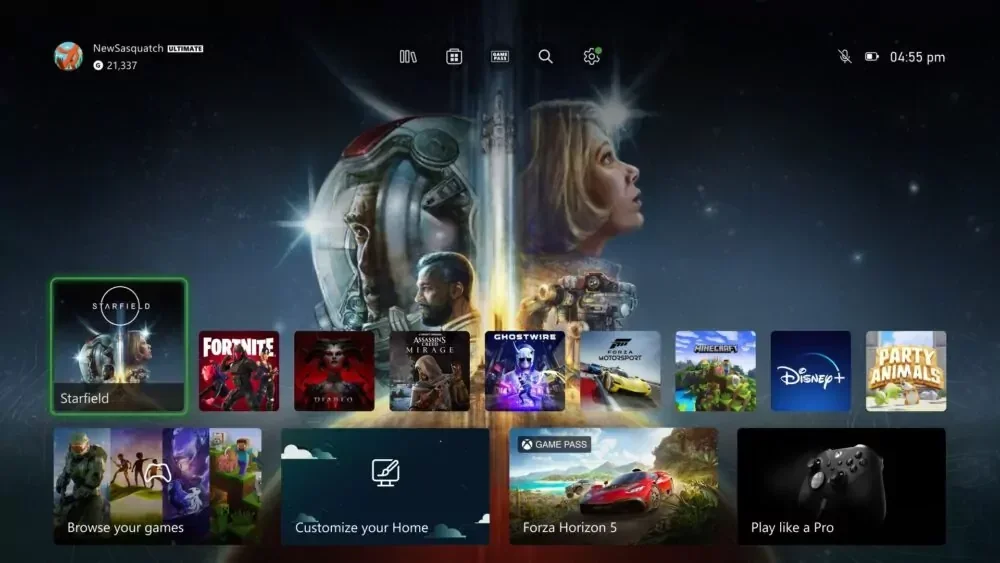
System apps like Settings or the Store can now be hidden entirely, so your Home screen only shows what matters to you. No more accidental launches of the Store when you’re trying to get into your game.
These tweaks first appeared in last month’s beta tests, but Microsoft has sped up the rollout so everyone gets the new customization tools right away. Whether you’re a casual player who wants quick access to a couple of titles or a power user who shuffles through dozens of apps, this update makes it simple to shape your Xbox experience exactly how you like.





0 Comments
Leave a Reply