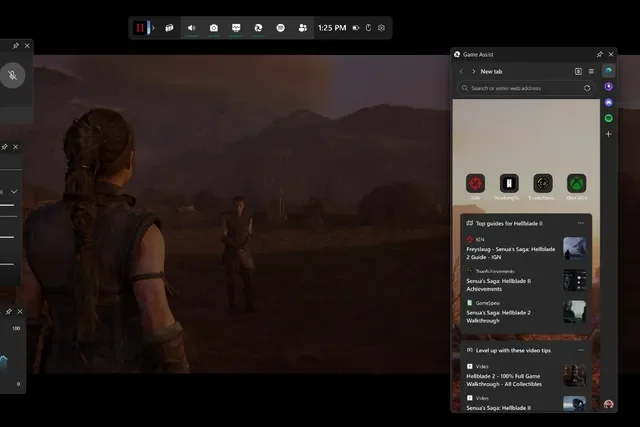

Microsoft has officially launched Game Assist, a Steam-like in-game browser overlay for Windows 11, making it easier for gamers to access tips, guides, and walkthroughs without ever leaving their game. Much like Valve’s Steam overlay browser, Game Assist detects the game you’re playing and automatically suggests relevant tips and guides in a side panel. This eliminates the need for gamers to alt-tab out to look up walkthroughs, strategy guides, or solutions to in-game puzzles. Even if a game isn’t officially supported, players can still use Game Assist to browse guides, forums, or any other websites while playing. Read more in our articles including "Microsoft Rolls Out Steam-Style Game Assist Overlay for Windows 11 Gamers" and "10 Video Games to Watch Out For in March 2017".
Microsoft has officially launched Game Assist, a Steam-like in-game browser overlay for Windows 11, making…
Jan 22, 2025These past months have been a big blast for the gaming community with the launch…
Feb 19, 2017There are tons of games that you can play on iOS and Android, but what…
Jul 31, 2017The Steam Summer Sale kicked off last June 23, and some of the deals on…
Jun 27, 2017
With the latest addition to the Call of Duty franchise, Modern Warfare 4, dropping…
Sep 1, 2026
Gaming handhelds in the Philippines now span from ₱1,550 to almost ₱60,000, and the catalog…
Jun 6, 2026Microsoft has officially launched Game Assist, a Steam-like in-game browser overlay for Windows 11, making it easier for gamers to access tips, guides, and walkthroughs without ever leaving their game. Much like Valve’s Steam overlay browser, Game Assist detects the game you’re playing and automatically suggests relevant tips and guides in a side panel.
This eliminates the need for gamers to alt-tab out to look up walkthroughs, strategy guides, or solutions to in-game puzzles. Even if a game isn’t officially supported, players can still use Game Assist to browse guides, forums, or any other websites while playing.
Our coverage of in-game guides includes: "Microsoft Rolls Out Steam-Style Game Assist Overlay for Windows 11 Gamers"; "10 Video Games to Watch Out For in March 2017"; "5 Relaxing Games for Android and iOS (Part 2)". Each article provides unique insights and information.